
The latest update to the MDI 2 Manager in Techline Connect (version 9.1.2752.177) includes support for new MDI 2 wireless dongles. The new wireless dongles are similar to the previously used dongles, which have reached end of production. The old dongles are still supported for use with the MDI 2.
The new wireless dongles that are available can be identified by their color and size. The new dongle is white and slightly larger (Fig. 17) than the old model, DWA-131, which is black and slightly smaller.
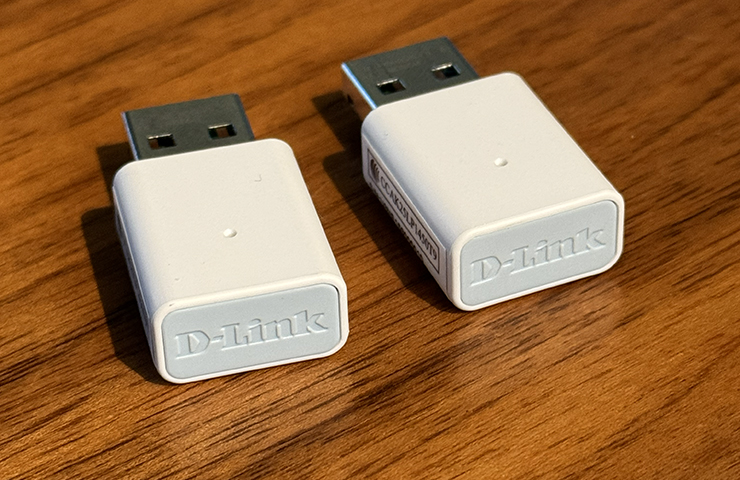
Fig. 17
TIP: Do not use any adapters or USB hubs with the wireless dongle, it must be plugged directly into a USB A port on the PC.
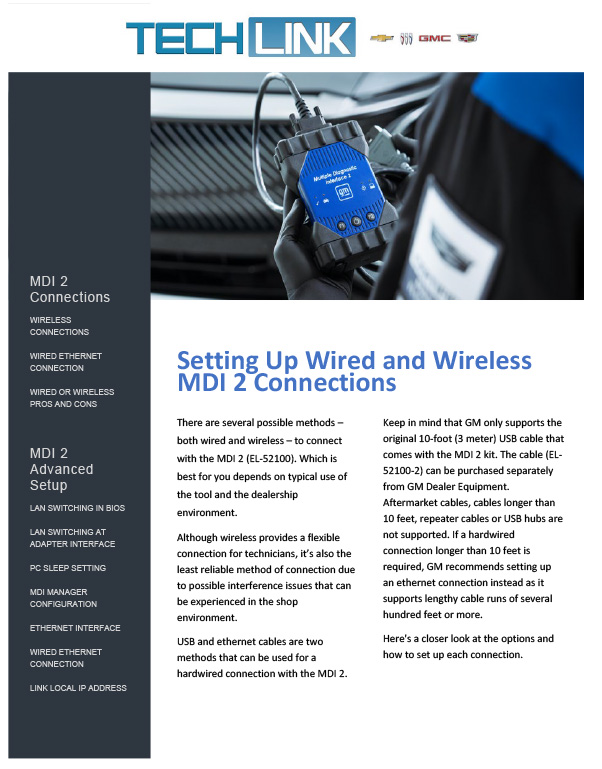
It is still recommended to use a hard-wired connection for SPS programming. Refer to these advanced MDI 2 configurations that detail the steps for hard wired connections.
Downloading and Installation
The update will download and install automatically upon logging into Techline Connect with the proper administrative rights.
If there are any issues with the installation, close Techline Connect, go to Control Panel > Programs and Features and remove all the following entries for the MDI/MDI 2:
- Bosch VCI Manager Launcher (GM) [Master] – 3.0.1530.16
- Bosch VCI Software (GM) [GM] – 9.1.2752.177
- GM MDI Software – 8.5.33.154
Next, launch Techline Connect to reinstall the update.
When updating from one core version to the next, many firewalls/antivirus programs will recognize it as a new application. Users may need to engage local IT support to ensure TLC is entered as an exception in these programs to allow normal functionality. As a user, you also need full local administrative rights to install the update.
If you have questions related to this communication, contact the Techline Customer Support Center (TCSC) at 1-800-828-6860.
– Thanks to Chris Henley
Updated February 9, 2026



The older stock wireless dongles are being sold until that inventory is depleted. If you purchase a new MDI 2, the new MDI 2 comes with the new version of the dongles. Otherwise, new individual replacement dongles will be available when the old inventory is depleted. Both “old” existing dongles and the new dongles function the same way.
Has anyone been able to purchase and use these adapters yet?
They are Wi-Fi 6 capable, but the software currently only supports 2.4ghz.
The new wireless dongles wifi 5 or 6 ?
You must purchase the dongles from Bosch’s website. They are similar to commercially available D-Link dongles but have specialized firmware. Off the shelf dongles will not work. The new Bosch dongles will be available shortly.
Will the AC1300 / AC13U adapters ordered directly from dlink work or do they need to be ordered from gm website.
If you are still having trouble after re-doing all the updates: Go to Settings > network and internet > select WI-FI > scroll down to WI-FI 2 > turn it on > scroll down to Random hardware addresses > turn it on. Wireless dongle connectivity is restored.
The MDI Manager update was to add support for the upcoming new dongles. There is nothing in the update that would have impacted your existing dongles. There have been numerous Windows updates that have negatively impacted the MDI 2 dongles recently that overlapped with the MDI Manager rollout. Several Global Connect communications walking through steps to correct this issue have been released — See Reference Number: 18418. If you’re still experiencing issues, create a CX One case and contact TCSC at 800-828-6860.
Don’t know what your update has improved. No one in my shop can use their dongles. Looking online I also see many techs not being able to connect using dongles at this time yet. Is there any idea when this may be resolved?
The black dongles (older stock) are continuing to be shipped until stock is depleted. They are functional and supported for use with the MDI 2.
Just received new MID2 point-to-point dongles from Bosch (EL-52100-4) they are the (black) DWA 131. received March 19, 2026. Don’t know if this is new old stock Bosch is delivering.
FYI I SET UP MY MDI TO COMMUNICATE VIS ETJHERNET CABLE CAT 8 AND USB C THIS HAS ELEMINATED ALL MY PROGRAMMING ISSUES AND SPEED IS MUCH FASTER, IVE EMAILED INTO EMERGING ISSUES ASKING WHY WE DONT RUN THIS CONFIGURATION AND RECIVED NO REPLY AT ALL. EVEN PROGRAMMING LYRIQ IMAGE PROCESSING MODULES TIME CUT DOWN ITS PAIN TO SET UP BUT I STRONGLY RECOMMEND TO ALL MY FELLOW TECHS.
I have been on the phone for an 1.5 hour with Techline support and no resolution
Was finally able to resolve the wireless dongle communication. Make sure location services is enabled on windows settings. This will prevent point to point from working if it is disabled.
For assistance, create a CX Connect case and then contact TCSC at 800-828-6860.
How do we get the old dongles to function again? A previous update made them all stop working.
When you receive the update, all PCs and all MDI 2s in the service department need to be updated at the same time; otherwise, a mismatch in software can occur. The update is tied to the BAC of the dealership and technician IDs are also matched to the dealer’s BAC. Recently changing dealerships also can impact the update if you log in with an ID tied to a different BAC. If you have any issues with the software, please contact TCSC.
We had an MDI that got the new update, but the PC MDI manager software level got rolled back. Wasn’t compatible with each other. Performed a Recovery on the MDI and reset the Software level on the MDI to match the PC software level. MDI operating normal at this time.
DB100549 was incorrectly listed in the article as the new dongle model number. Currently, Bosch has the old dongle in stock. We’re in the middle of the new MDI Manager rollout that should conclude on February 18. The new dongle should be available within the next 2 weeks. Look for an update to the article with the new dongle part number when it’s available for purchase. Going forward, both dongles will be supported.
i called Bosch today and was told they don’t know anything about a DB100549
Please contact Bosch regarding dongle availability. You need to register with the site or contact them via phone. Go to https://gmmdi.service-solutions.com/ or call 800-345-2233.
There are also 2 part numbers on the website but they do not specify which ones are the newer version. EL-52100-4($48.63) or 1699200155($37.26)
After recent techline updates, it has rendered all shop pcs along with personal laptops to stop communication with the mdi via point to point as it just no longer sees wireless mdi 2’s, only shows usb and then a red X after disconnecting the cable to pair. We have tried resetting the mdi’s and also completely uninstall and reinstalling techline software but still mdi manager is unable to recognize the wireless dongle. Pc’s do see the d-link dongle but mdi managed does not. Has anyone seen any similar issues?
The dongles should be available soon at the Bosch website. You need to register with the site or contact them via phone. Go to https://gmmdi.service-solutions.com/ or call 800-345-2233 – GM MDI 2 sales.
Where can we get the new Dongle’s
Please contact TCSC with any questions or concerns about the latest update.
Hello, I installed the 9.1.2752.177 update last Friday and today It rolled back my PC software to 9.1.2375.152, rendering the MDI SW incompatible. What’s going on?
Are there any other identification numbers.I am unable to find that on the D link web site.Where can you get the dongles?
talking to dlink this model to them has been discontinued. why can’t we by them from dlink directly
The new MDI Manager is tied to the BAC of the dealerships that receive the update, which is being released in phases. Phase 1 is Michigan, Minnesota and Medium-Duty dealerships. If your ID is tied to a dealership in one of those states/categories, when you log in to TLC with proper administrative rights, you’ll be prompted to install the new MDI Manager on the PC. Next, you need to plug in all MDIs with a USB cable to update the new software to match the PC. If someone has already done this to the MDI 2 and it’s a shared MDI 2, everyone that uses that MDI 2 will need to log in to their PC to update the MDI Manager to match. If you’re still having issues after the updates, please contact TCSC at 800-828-6860.
Our MDI 2’s are receiving the new update but there isn’t an update for the Pc, so we are getting a message that our Pc is not on the same software version as the MDI 2 and we’re dead in the water.
What’s going on with that?
The rollout of the supported MDI Manager will take place over the next 5 weeks. The dongles should be available soon at the Bosch website. You need to register with the site or contact them via phone. DO NOT purchase similar looking dongles from any other site or you risk issues with your MDI 2 and/or vehicle programming/diagnostics. These dongles and drivers are specific to the MDI 2. For more information, go to https://gmmdi.service-solutions.com/ or call 800-345-2233 – GM MDI 2 sales.
Where can you but these?